ArtiGo brings template-driven AI art to Android photo creators
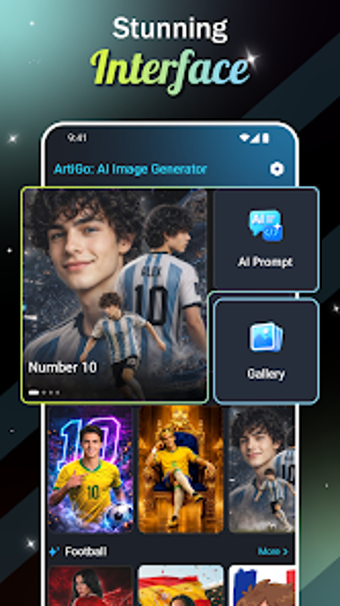
On a coffee break, when a quick selfie should become shareable art, ArtiGo: AI Image Generator, by Vu Ha Thi, aims to simplify photo-to-art conversion for casual creators. The app provides a template-driven workflow so users pick a curated style, upload a photo, and generate images without writing text prompts. Templates cover portraits, fantasy, fashion, and sports, while output sizes and direct save/share options support posting and personal projects for hobbyist creators and social sharers.
A template-first workflow keeps image creation simple
The app replaces prompt writing with curated templates, so creators select a style and upload a photo to generate art. ArtiGo focuses on a visual, four-step production path: browse templates, choose a theme, upload an image, and tap generate. That approach supports portrait and avatar creation as specific tools, making the process approachable for users who prefer guided choices to manual text prompts. Results aim for consistency because templates provide artistic direction.
Designed for Android, with direct saving and social sharing
Platform compatibility centers on Android devices, with the application available via the Play store and optimised for modern Android versions. The app exposes options to choose output image sizes and to save generated images to the device, plus integrated sharing to social platforms for quick distribution. That model keeps the workflow on the phone and removes extra transfer steps, while cross-platform availability beyond Android is not indicated.
Beginners gain low-friction access, but accessibility specifics are limited
The interface is presented as beginner-oriented, emphasising a visual-first creation path that reduces onboarding friction for new users. Because the tool avoids complex prompt engineering, weekend creators and hobbyists can produce work without a steep learning curve. The app’s public feature list highlights ease of use, however it does not specify screen-reader support or high-contrast modes, so users with specific accessibility requirements should verify those accommodations independently.
Fast, share-ready output suits casual posting, while control is constrained
Daily utility centres on quick, stylised images for sharing, with curated themes and selectable sizes that make profile images and social posts easy to produce. The template model speeds results but limits fine-grained control, so users who need precise prompt-based tweaks or experimental prompt engineering may find other tools better suited to that task. For straightforward portrait transforms and themed artwork, the app supports fast publishing workflows.
To sum up, it suits casual creators seeking guided results
To sum up, ArtiGo is a practical option for casual creators and hobbyist image-makers who want fast, visually guided artwork with minimal setup; it is less suitable for people who require detailed prompt control or advanced customization. A useful tip: choose portrait-focused templates and the largest output size when exporting profile-ready images to preserve detail for social sharing.